
Before 16 December 2026, 12:00 UTC
Help preserve it
Record your own game while the official servers still answer. One login preserves your account; each task below settles a part of the game that is still a guess.
29days 16 : 08 : 33
until the official servers close on .
About 10 minutes on an Android phone. On iPhone you need a Windows PC or a Mac for the same 10 minutes. The same guide is also a Google Doc. So far 23 players on EU, NA and SEA servers have sent 128 recordings, and 29 accounts are preserved.
The short version
On an Android phone, about 10 minutes. On iPhone it works the same way with a PC: see below.
Set up PCAPdroid once. It is a free app that records only Lord of Nazarick’s data (how to set it up).
Fully close the game, then tap Start in PCAPdroid. Now open the game and log in.
Open your profile card and your mail. That alone is enough to preserve your account. With a few more minutes, open your character list, your bag and each character’s page too. Everything else you do while recording helps us rebuild the game, so play as long as you like: battles, summon pages, events, any of the tasks below. The more, the better.
Close the game and tap Stop in PCAPdroid. It saves a
.pcapfile in your phone’s Download folder. Send it with the form.
A recording is not a video. You don’t need to record your screen: the .pcap file is the recording. It holds only the data the game and its server sent each other while you played. A short test counts too, so send it rather than deleting it.
Why it matters: the game’s files are already preserved, but everything the server decided (your account, the summon pools, how battles are calculated) disappears with it on 16 December. A recording shows what the server answered. No public release is available or scheduled. We are awaiting approval, or any word on the project, from the game’s rights holders.
12 optional tasks
Going further
Your account needs only the short version above. These tasks cover the parts of the game we still know least about. Do as many as you like in the same recording, and tell us which in the form’s message. Pick a task to see what it finishes.
-

The team table before a Realm of Shadows battleTest run, 14 Oct 2026 -
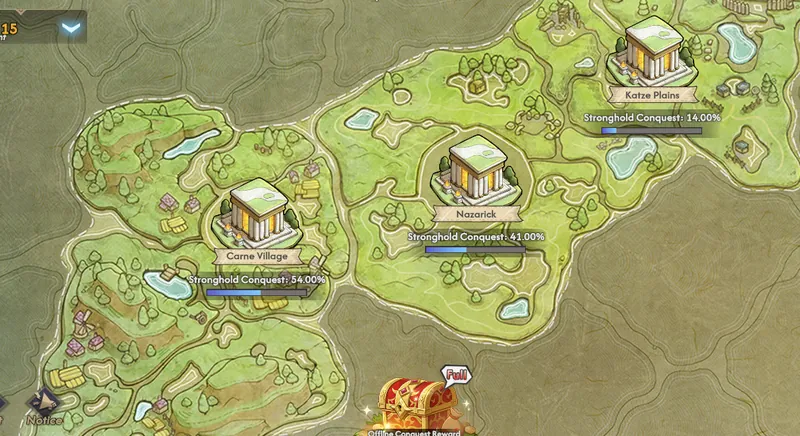
The World Conquest mapTest run, 14 Oct 2026 -

Moving across a snowfield on the world mapTest run, 13 Oct 2026
The whole game
Each column is one part of the game, filled to how far along it is. Pick a task to see what it finishes.
- About 10 min
Open your profile card, character list, bag and mail. Then open each of your characters’ detail page once.
Finishes
Preserves your whole account: characters, items, story progress and events.
- About 10 min
Summon page: for every banner, open Details / Rates and scroll the list to the bottom, then open History. No pulls needed. Any lucky banner you see is especially wanted.
Finishes
- Summon pools 90%
Settles 10 open rows in the progress tables: Summon banners (10).
- About 45 min
Easy stages, Auto off. Rotate teams so every character you own fights at least once, and use each one’s skills and ultimate. About 15 to 20 battles. Never recorded fighting yet: Igvarge, Britta, Climb (Faithful Dog), Gagaran, Hilma, Kyuku, Mare (Ego Seeker), Narberal, Nphirea, Shasuryu, Shuringan, Tina, Vampire Bride.
Finishes
- Damage formula 98%
- Skill effects 99%
- Character mechanics 95%
Settles 160 open rows in the progress tables: Resource quests (75), Expedition (34), Story (24), Commissions (11) and more.
- About 30 min
Whatever you can reach: a duel (invite, both accept, fight), a Duel Trial match, a Combat Contest match, a Joint Raid (create or join a room, fight), a Duel Arena match (a Qualifying Round match, or a final played to its end).
Finishes
- Skill effects 99%
- Combat Contest 93%
- Duels 80%
- Duel Trial 80%
- Joint Raid 85%
- Duel Arena 98%
Settles 32 open rows in the progress tables: Joint Raid (17), PvP (12), Events (3).
- About 30 min
Holy Ruins: fight one floor on Easy and one on Hard, and one Phantasm stage. Pinnacle: one floor, and the first login after its weekly change. Demonic Tower: enter, walk the map, open the chests you reach, take a blessing, fight one floor (a floor with a mutation running, and the level 21 boss, if you can). Lost Land if unlocked: one run in a realm with battles (any realm but the fourth). One story quest maze if you have one open.
Finishes
Settles 116 open rows in the progress tables: Demonic Tower (51), Holy Ruins floors (32), Quest maps (19), Holy Ruins rewards (7) and more.
- About 30 min
A boss that summons adds or splits, bosses with shields, the Ancient Colossus with its Primogems, wherever you meet it, a stage where enemy reinforcements arrive (Expedition 3-3, or Celestial Hills 104-05), and one battle you lose on purpose.
Finishes
- New players 99%
- Damage formula 98%
- Skill effects 99%
- Monster behaviour 85%
Settles 47 open rows in the progress tables: Realm of Shadows (42), Characters (2), Supremes (1), Abilities (1) and more.
- About 15 min
Open a character’s detail page and note the power. Level up once, open it again. Repeat with one equipment piece and one skill node. Do this for 3 characters. Then level up your Supreme once and open its talent page.
Finishes
- New players 99%
- Power number 81%
- About 20 min
As many enchant rolls as you can spare (20 or more helps most). Open the skill reset preview and cancel it. Tap an Expedition chapter’s star chests to preview them. In your bag, tap each box or pack you haven’t opened so its contents show (no need to open it). Open the reward preview of a few Realm of Shadows stages (1-5, 21-30, 41-50) and Treasury levels 18-20.
Finishes
- Enchanting 85%
- Reset refunds 88%
- Shops, items, mail 97%
- Story and stages 97%
- Realm of Shadows (Supreme Tower) 96%
Settles 240 open rows in the progress tables: Resource quests (49), Realm of Shadows (47), Expedition (44), Story (22) and more.
- About 10 min
Start a normal stage, close the app mid-battle, reopen it, log in and let the battle resume. Once more after one of your characters has died in that battle.
Finishes
- About 10 min
Walk into your alliance hall (this saves your alliance with its members and banner), open the alliance member list, the Combat Arena ranking and the power ranking, and tap through as many profile cards as you can. This saves other players’ public data.
Finishes
- About 20 min
In each running event: claim one reward, buy one item in its shop, play one stage. Open Monster Hunt if it is running, and a lent character’s detail card there. Never recorded yet, if any runs before the shutdown: Mystic Quest, Battle Anthem, Celestial Blessings, Cherry Ballad, Party Royale, Feast Prep.
Finishes
- Seasonal events 97%
- Rewards and rankings 94%
Settles 58 open rows in the progress tables: Events (58).
- About 5 min
In the last days before 16 December (the servers close at 12:00 UTC): log in, open your mail, and record the shutdown notice.
Preserves your account’s final state and the shutdown notice itself.
On Android
With PCAPdroid, a free, open-source recording app. It records only Lord of Nazarick’s traffic and sends nothing anywhere.
Set up PCAPdroid (once)
Install PCAPdroid by emanuele-f from the Google Play Store. It is free and doesn’t need root.
Open it and accept its first-start prompts.
Set Target app to Lord of Nazarick, so only the game is recorded, and Dump mode to PCAP file. Leave TLS decryption off.
Record
Fully close Lord of Nazarick: swipe it away from your recent apps. Every recording must start with a fresh login.
In PCAPdroid tap Start, choose the Download folder and accept the VPN prompt. The VPN runs only on your phone.
Open the game, log in and wait until you are in town. Open your profile card and your mail, then do anything else you like: the tasks above, battles, events. Everything you do helps.
Back in PCAPdroid, tap Stop. The
.pcapfile is in your phone’s Download folder. Send it to us.
No screen recording or video is needed: the .pcap file is the whole recording.
iPhone and a PC
The PC shares its internet with the phone and records the game’s traffic on the way through.
With a Windows PC
On the PC, install Wireshark from wireshark.org, keeping the Npcap option ticked in its installer.
Open Windows Settings → Network & internet → Mobile hotspot, share your connection over Wi-Fi and turn it on.
On the iPhone, join that hotspot’s Wi-Fi. Fully close Lord of Nazarick.
In Wireshark, start capturing on the hotspot’s adapter. It is named like “Local Area Connection* 12”; pick the one whose activity line moves when the phone opens a web page.
Open the game and log in. Open your profile card and your mail, then do anything else you like.
Stop the capture, choose File → Save As, keep the .pcapng format, and send it to us.
iPhone and a Mac
Connect the iPhone by USB and find its UDID in Finder. In Terminal, run rvictl -s <UDID> (it comes with Xcode), capture on the new rvi0 interface in Wireshark while you play, then run rvictl -x <UDID>.
No computer?
If your account is linked to a login that also works on Android, log in once on an Android phone that still has the game and use PCAPdroid. Otherwise send us your server region and name, and your player ID: your public profile can still be saved from someone else’s recording (task 10).
Send it privately
A recording holds your current game session (a login token that expires), your phone’s network details and what other players showed in the game. Your password is not in it.
Upload it with the account retrieval form (up to 10 recordings, .pcap or .pcapng, 25 MB in all), or e-mail it to [email protected] with your in-game name, server region (EU, NA or SEA) and name, and player ID (the number on your profile card).
What we keep
Your account is imported with its game progress (characters, items, story, events) and without login tokens, device IDs or e-mail addresses. The recording itself stays in our private, encrypted archive, never published or shared; our Privacy Policy says how long, and how to have it deleted.
- Name each file with your in-game name and the task number, for example
Momon_task3.pcap, or tell us which task each file is. - Too large to attach? Send a private Google Drive or OneDrive link, or write first and we send you an upload link.
- Not sure it worked? Make a two-minute test first (log in, open your profile, stop) and send it. We check it and tell you, and a short test is useful data too, so don’t delete it.
- Never post a recording in Discord, a forum or any public channel.
Before you start
- Finish the game’s big download first. Open the game once without recording and let the download complete; recording it only makes a huge, useless file.
- Use Wi-Fi and a charged phone.
- No real money. Nothing here needs a purchase.
- No mods or cheats on your account while the official servers are up. A ban would end your recordings.
- Did you record a brand-new guest start before 14 October? Thanks to the players who sent theirs, the original opening battle and a new account’s first minutes are restored. Another one, especially one that goes further into the tutorial, is still welcome.
Until 16 December
- Keep the game installed. It has left the app stores, so a removed copy cannot come back.
- Don’t clear its data or reinstall it.
- Hold off any store update of the game until you have recorded.
The documents
For sharing with other players. The pages on this site are updated from the project’s latest data and can be newer than the Google Doc.
Recording guide
Google Doc: the steps, the 12 tasks and an overview of the project’s progress.
Progress
On this site: each part of the game and how far along it is, then every character, banner, stage, mode and event, with what is missing, which recording helps and who delivered it first.
Bounties
On this site: what to record first and why, and who delivered what.